
0%
SUN-THU: 9:00AM - 06:00PM (AST)
For building materials traders and importers

One system from purchase requisition to cash

Procurement, imports, warehouse, sales, inter-company material issue and finance, with every document, approval and cost traceable back to source. Built for trading and import companies of roughly 20 to 200 staff across Saudi Arabia, the UAE, Qatar and the wider GCC.

  • Landed cost before the sale
  • Stock with an address
  • Approvals with an audit trail
  • Month-end without spreadsheets

The demo opens the working product in a new tab. No sign-up, no form first.

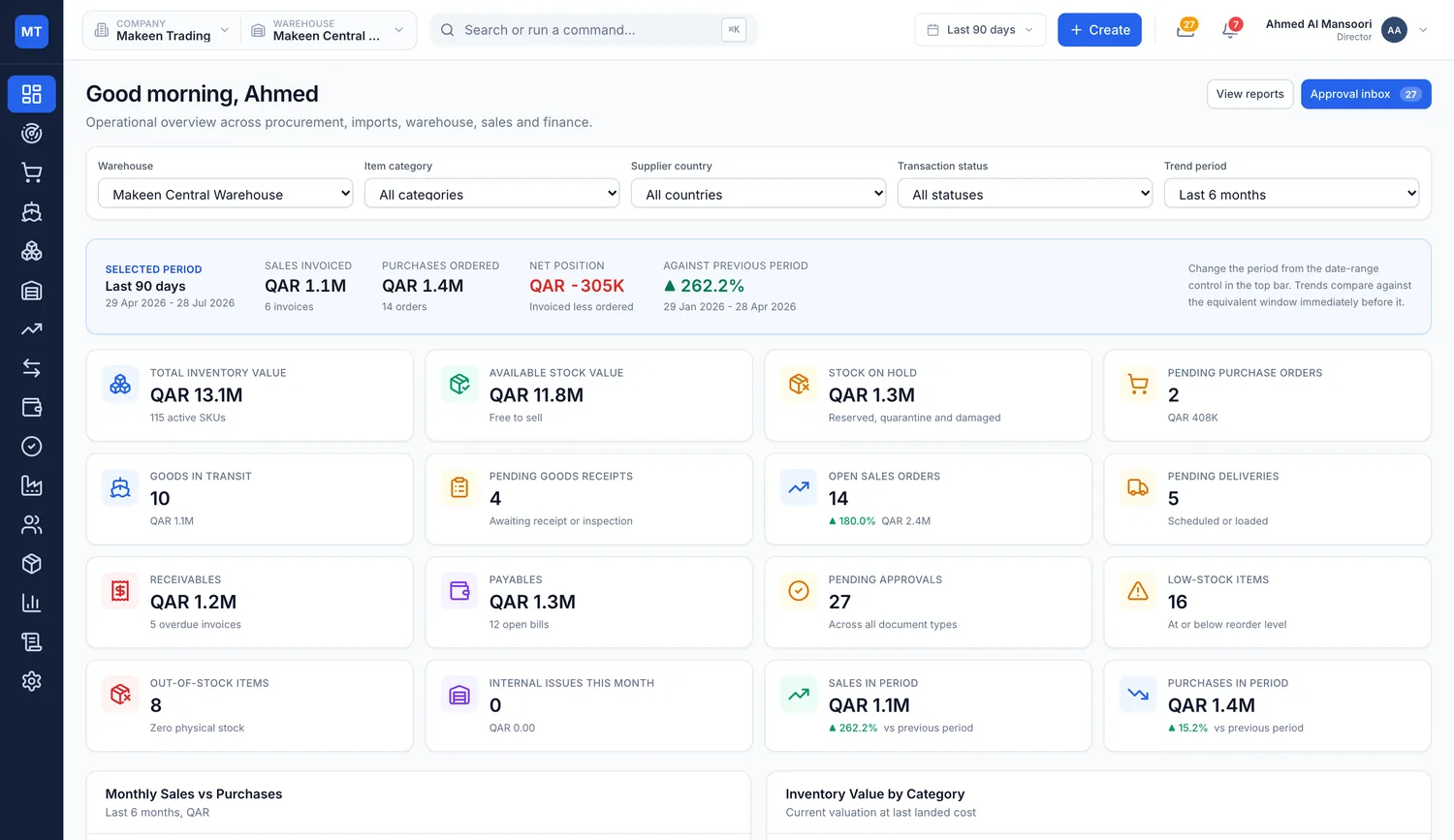
Makeen TradeFlow dashboard showing total inventory value, available stock, goods in transit, receivables, payables, pending approvals and a monthly sales versus purchases chart
15 modules
85+ screens
42 built-in reports
8 permission-scoped roles
6 purchasing currencies
6 sourcing countries
100% audit trail on every change

Four things that quietly cost traders money

None of them are dramatic. They are all ordinary, and they all compound.

Landed cost arrives after the sale

Freight, duty and clearing land weeks after the container does. By then the stock is priced, sold, and the real margin is anyone's guess.

Nobody can find the stock

The system says forty pallets. The yard says maybe. Someone walks the racks to check, and the customer waits.

Approvals live in WhatsApp

A purchase was approved by someone, on some day, in a chat nobody can produce when the invoice is queried.

Month-end runs on spreadsheets

Stock value, receivables and inter-company issues are rebuilt by hand every month, and the numbers rarely agree first time.

Requisition to payment, in one chain

Every step writes to the same record, so nothing is re-keyed and nothing is rebuilt later.

  1. Requisitionraised and routed
  2. RFQto shortlisted suppliers
  3. Purchase orderawarded on comparison
  4. Shipmentcontainer and B/L tracked
  5. Customsdocument checklist
  6. Landed costallocated across lines
  7. Stockreceived, put away, binned
  8. Sale or site issueexternal or inter-company
  9. Invoicethree-way matched
  10. Paymentsettled and aged

Six areas that carry the operation

Import and landed cost

Every shipment tracked from the supplier to the port, and every cost that lands with it pushed back into the item.

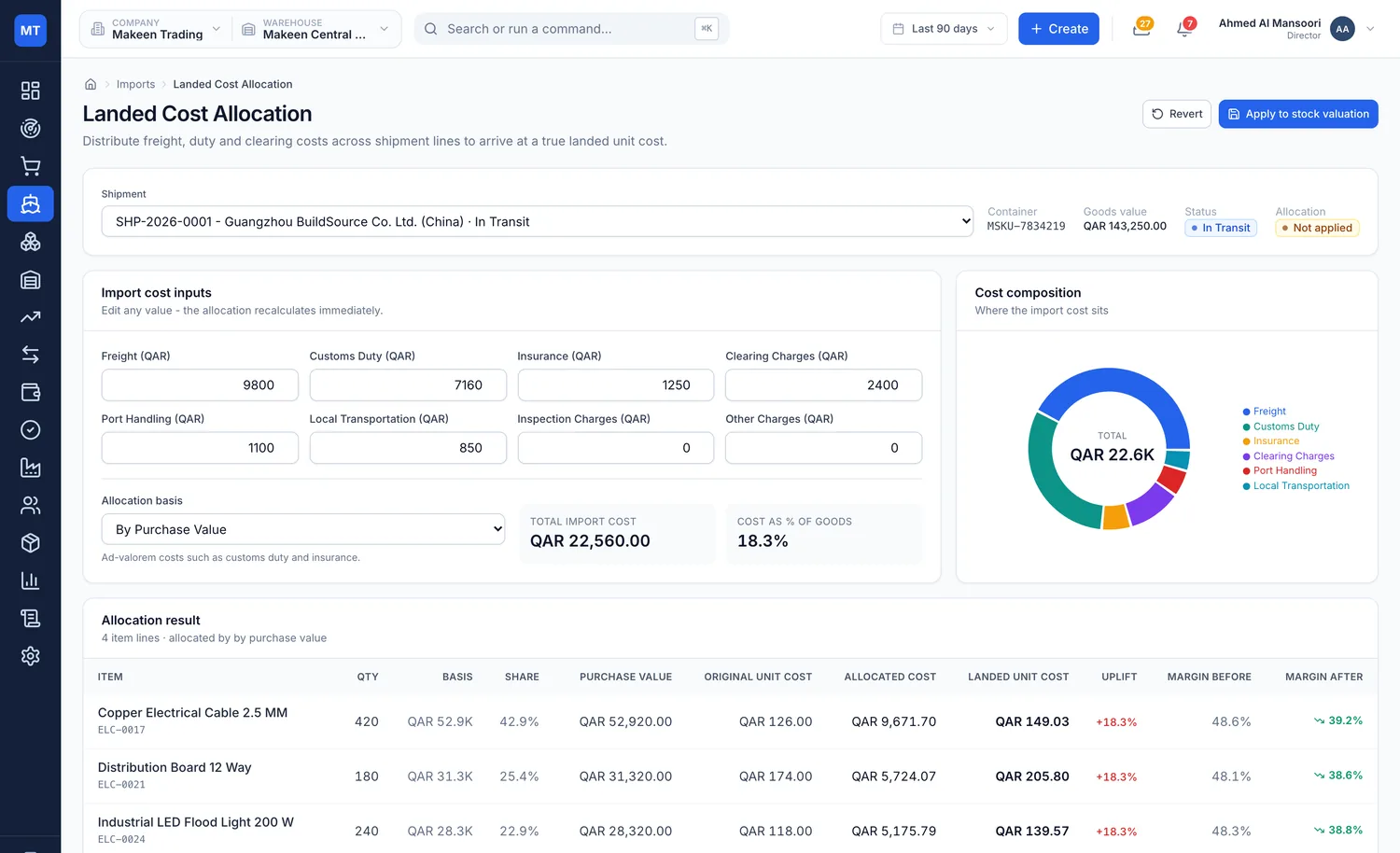
Freight, customs duty, insurance, clearing, port handling and inland transport are distributed across shipment lines on the basis you choose, and the true landed unit cost is recalculated before the stock is ever sold.

  • Five allocation bases - quantity, weight, volume, value or manual entry
  • Reconciles to the penny - rounding is absorbed on the final line, every time
  • Margin impact shown instantly - switch basis and see what it does to the line
  • Customs checklists that block - submission stops when a certificate is missing
  • Container and bill of lading tracking - milestone timeline from supplier to port to yard
  • Six screens - dashboard, shipments, clearance, allocation, documents, tracking
Landed cost allocation screen with freight, customs duty, insurance and clearing inputs, an allocation basis selector, a cost composition chart and per line landed unit cost with margin before and after

Warehouse control

Zone, rack and bin level control with live capacity, so stock has an address rather than a rough location.

Receiving separates accepted, rejected, damaged and short quantities before anything reaches the shelf, then hands over to putaway against specific bins. Picking, packing and dispatch stay separate, auditable steps.

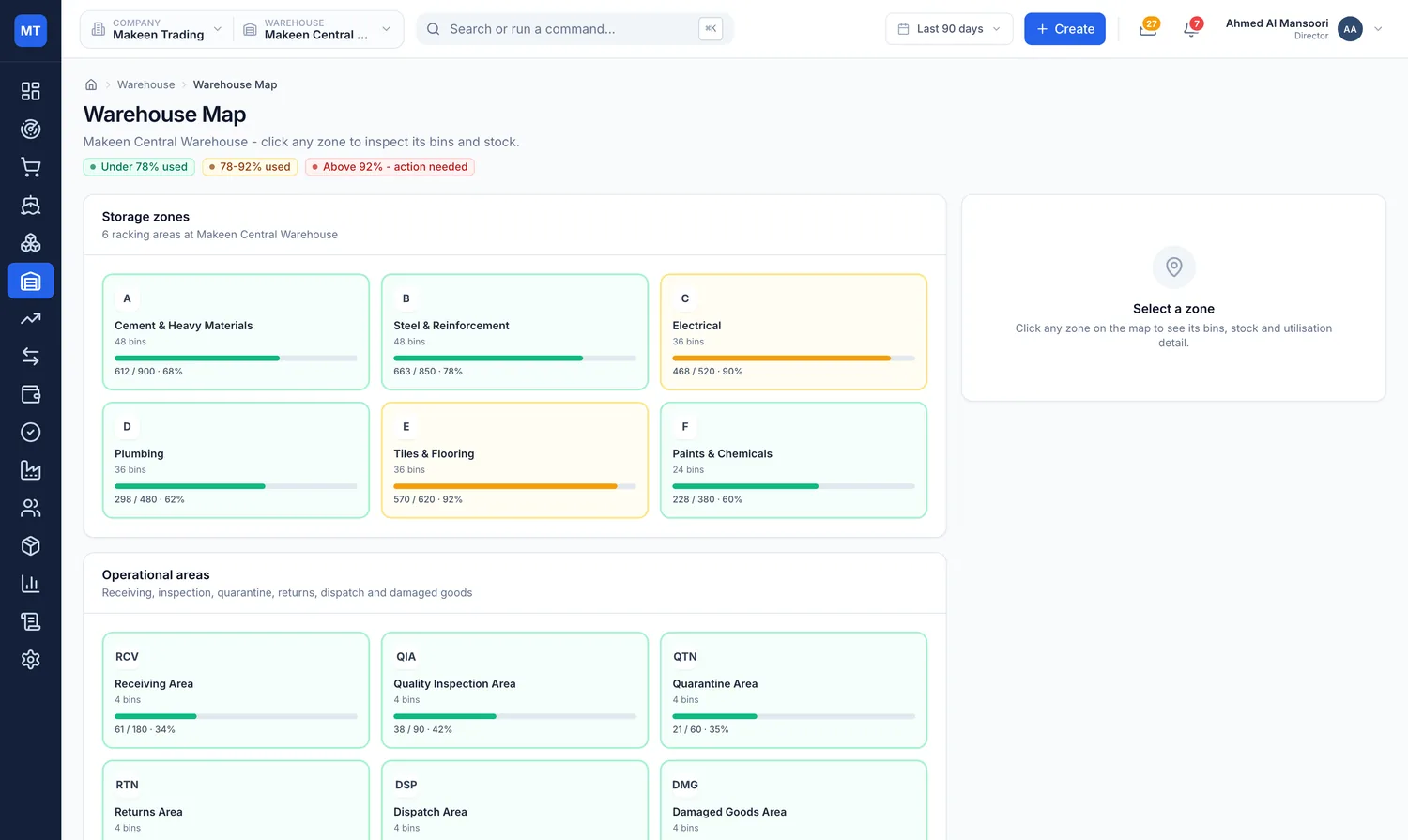
  • Interactive warehouse map - zones, racks and bins with live utilisation
  • Receiving that splits quantities - accepted, rejected, damaged and short, recorded apart
  • Putaway to a named bin - not a shelf someone remembers
  • Cycle counts and quarantine - rolling counts, damaged stock held separately
  • Bin and stock transfers - recorded on both sides
  • Twelve screens - overview through to the full activity log
Warehouse map showing zones, racks and bins with occupancy and capacity utilisation

Procurement and approvals

An eleven-stage purchase lifecycle where approval, shipment, receiving, billing and payment status are tracked independently on every order.

Requisitions become RFQs, quotations come back and are compared side by side before the award. One approval inbox covers requisitions, purchase orders, payments, stock adjustments, discounts and internal issues.

  • Side by side quotation comparison - award from the comparison, not from an inbox
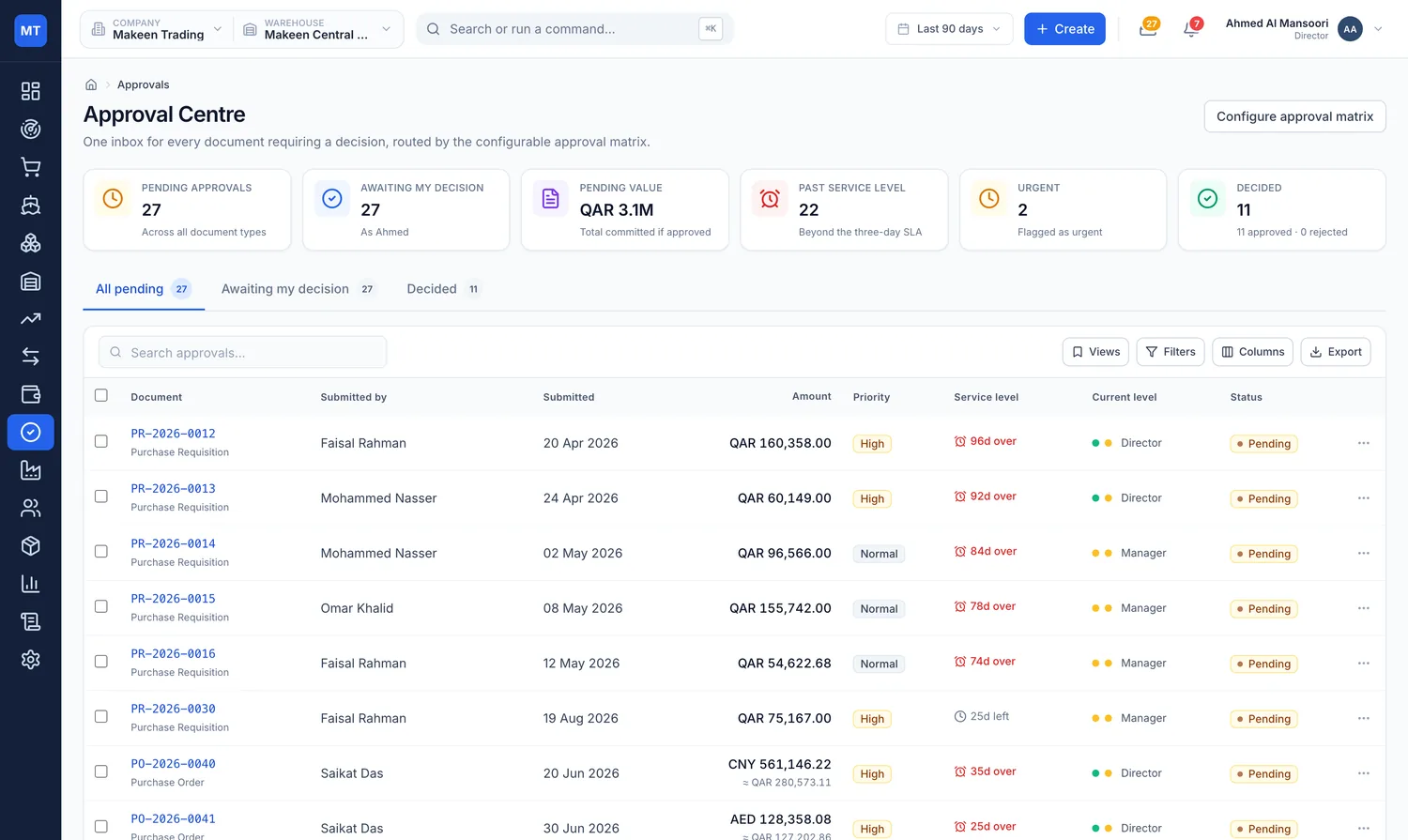
  • Configurable approval matrix - routed by document type, value and urgency
  • Multi-level authority with SLA tracking - status propagates back to the source document
  • Supplier scorecards - on-time delivery, quality acceptance, lead time, price competitiveness
  • Receipts, bills, returns, payments - each its own auditable step
  • Eleven screens - dashboard, requisitions, RFQ, quotations, comparison, orders and more
Approval centre listing documents awaiting approval with value, approval level and status

Sales and finance

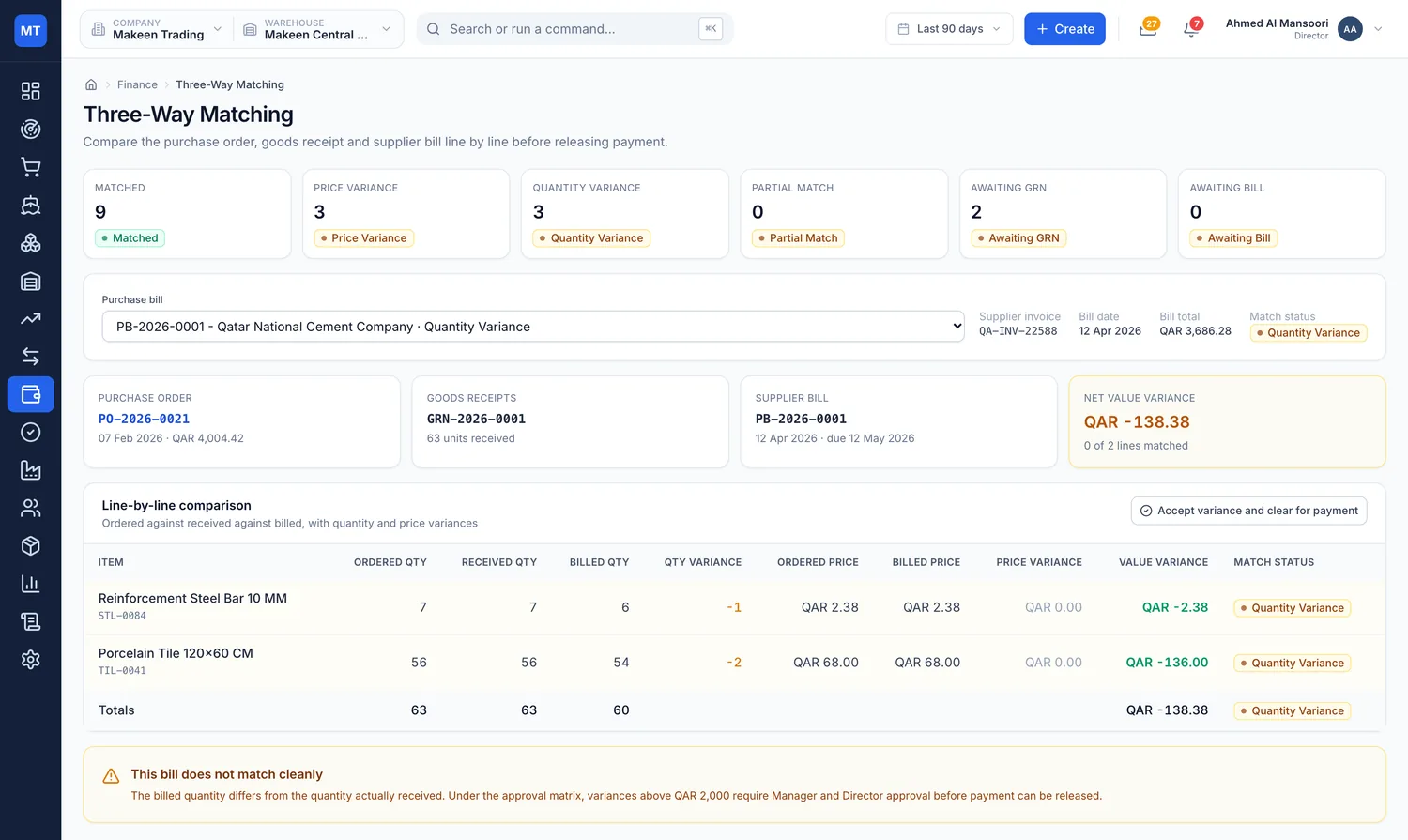
Reservation, picking, packing, delivery and invoicing stay separate, and finance matches the order, the receipt and the bill before anything is paid.

Customer credit checks sit on file. Receivables and payables ageing, multi-currency exposure and tax summaries come out of the same ledger the operation runs on.

  • Three-way matching - order to receipt to bill, before payment is released
  • Credit checks on file - checked at order, not discovered at invoicing
  • Receivables and payables ageing - with customer and supplier statements
  • Multi-currency exposure - rate recorded at entry, so differences stay auditable
  • Price lists, returns and credit notes - handled against the original document
  • Fourteen finance screens - dashboard through to chart of accounts
Three-way matching screen comparing ordered, received and billed quantities before payment

Inter-company material issue

Supply your own contracting arm against a project or cost centre, and have it show up correctly on both sides.

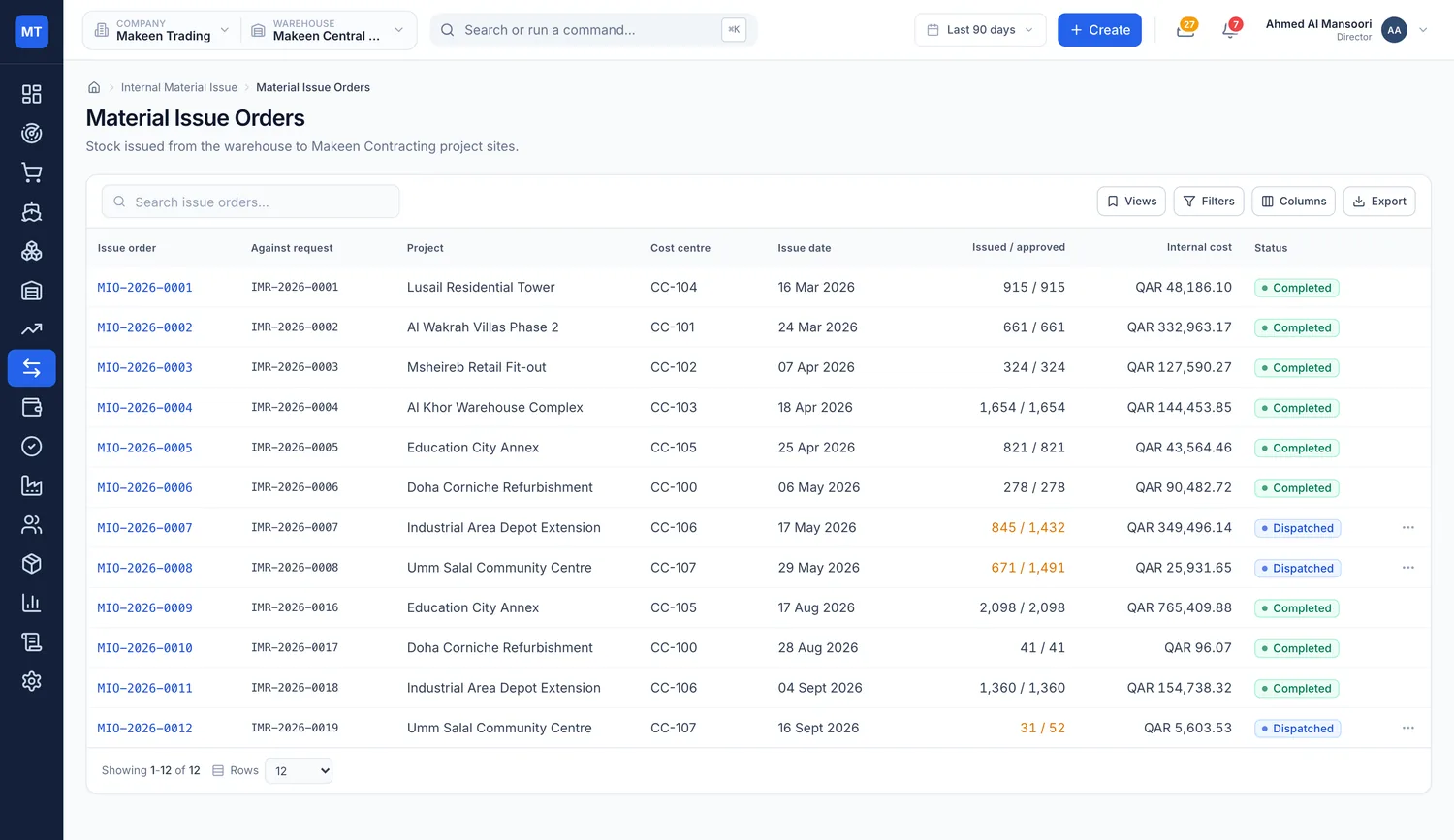
Post it as project consumption or as an inter-company sale. The treatment is configurable, and either way it is fully auditable rather than a note in a spreadsheet.

  • Internal requests and issue orders - raised, approved and dispatched like any other document
  • Issued against project or cost centre - so site cost is real, not estimated
  • Two treatments, configurable - project consumption or inter-company sale
  • Transfer register - every movement between entities in one place
  • Internal cost summary - what the contracting arm has actually consumed
  • Six screens - request through to cost summary
Material issue orders listing internal issues to projects with treatment, value and status

Reporting and audit

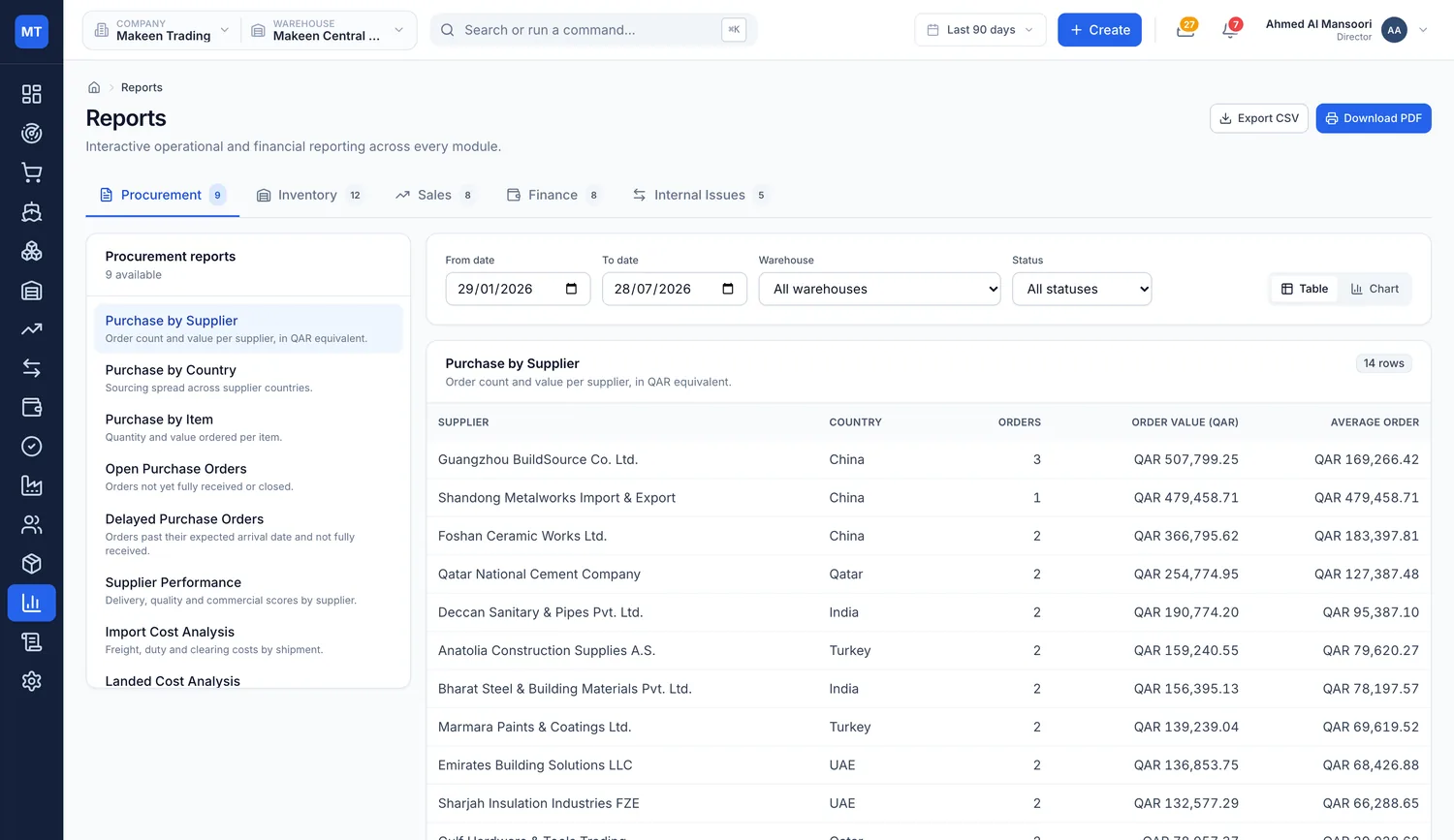
Forty-two built-in reports, every one filterable, exportable and printable on company letterhead.

Each report carries the commercial registration number, tax card, the exact parameters it was run with, who prepared it and when. Behind them, an audit log records every change: who, what field, previous value, new value, role and device.

  • Nine procurement reports - including landed cost analysis and purchase price variance
  • Twelve inventory reports - ageing, slow-moving, dead stock, batch expiry, valuation
  • Eight sales and eight finance reports - margin, ageing, statements, currency exposure
  • Five internal reports - material issued by project, by cost centre, consumption by item
  • Table or chart, CSV or PDF - switchable view, repeating headers, grand totals
  • Full audit log - filterable and exportable, field level before and after
Reports library listing the built-in procurement, inventory, sales, finance and internal reports

Everything included

Fifteen modules and more than 85 screens, so you can compare the whole scope against anything else on your shortlist without asking for a feature list.

Buy

From the requisition to the goods on your shelf

Procurement

11 screens

Eleven-stage purchase lifecycle with approval, shipment, receiving, billing and payment status tracked independently on every order.

  • Purchase dashboard, requisitions, requests for quotation
  • Supplier quotations, side by side comparison and award
  • Purchase orders, approvals, goods receipts
  • Purchase bills, returns and supplier payments

Imports

6 screens

Container and bill of lading tracking from supplier to port, with customs document checklists and shipment milestone timelines.

  • Import dashboard and shipments
  • Customs clearance and import documents
  • Landed cost allocation
  • Shipment tracking

Landed Cost Engine

5 allocation bases

Freight, customs duty, insurance, clearing charges, port handling and inland transport distributed by quantity, weight, volume, value or manual entry. Rounding is absorbed on the final line so the allocation reconciles exactly.

Master Data

7 registers

Supplier scorecards track on-time delivery, quality acceptance, average lead time, price competitiveness, purchase value, open orders, return rate and overall rating against service level targets.

  • Supplier directory with scorecards and performance ranking
  • Customer directory with credit terms
  • Item master, categories, brands, units of measure

Approvals

One inbox

Requisitions, purchase orders, payments, stock adjustments, discounts and internal issues in one place, on a configurable matrix routed by document type, value and urgency, with multi-level authority and SLA tracking.

Hold

Everything that happens while the stock is yours

Inventory

11 screens

Physical, reserved, available and incoming quantities per item, per location.

  • Overview, stock by warehouse, stock by location
  • Adjustments, reservations, stock counts
  • Reorder management, batch and serial tracking
  • Damaged stock, stock valuation, barcode station

Warehouse Operations

12 screens

Zone, rack and bin level control with live capacity utilisation.

  • Overview and interactive warehouse map
  • Receiving, putaway, picking, packing, dispatch
  • Stock transfer, bin transfer, cycle count
  • Quarantine and damaged, activity log

Sell and issue

Out to a customer, or across to your own contracting arm

Sales

11 screens

Reservation, picking, packing, delivery and invoicing as separate auditable steps, with customer credit checks on file.

  • Dashboard, quotations, sales orders
  • Delivery orders, picking and packing, dispatches
  • Sales invoices, customer payments
  • Sales returns, credit notes, price lists

Internal Material Issue

6 screens

Supply your own contracting entity against a project or cost centre, posted as project consumption or as an inter-company sale.

  • Internal requests and material issue orders
  • Internal dispatch and material consumption
  • Transfer register and internal cost summary

Account and prove

The numbers, and the evidence behind them

Finance

14 screens

Receivables and payables ageing, multi-currency exposure, and order to receipt to bill matching.

  • Dashboard, sales invoices, purchase bills
  • Three-way matching, customer and supplier payments
  • Expenses, credit and debit notes
  • Receivables, payables, bank and cash
  • Multi-currency summary, tax summary, chart of accounts

Executive Dashboard

16 KPIs, 10 charts, 8 widgets

Filters by warehouse, item category, supplier country, transaction status and trend period, with period on period comparison.

  • Inventory value, available versus reserved stock
  • Receivables, payables and pending approvals
  • Goods in transit, low stock and out of stock counts
  • Sales versus purchases trend, inventory by category
  • Purchase orders by country, stock movement, warehouse utilisation
  • Receivables and payables ageing
  • Top selling and slow moving stock, procurement status

Control Tower

16 exception types

A single exception feed across every module, ranked by severity and category, each drilling straight through to the underlying record. Exportable.

Audit log

Field level

Every change recorded: who, what record, which field, previous value, new value, when, role and device. Filterable and exportable.

Run the platform

Configuration, currencies, entities and access

Multi-currency and live rates

6 currencies

Purchasing in USD, CNY, TRY, INR, SAR and AED, sourcing from China, Turkey, India, Saudi Arabia, the UAE and Qatar. Live market rates are shown beside your stored rate with a variance column and optional auto-refresh, and are adopted deliberately rather than silently.

Multi-entity

Separate legal entities

A trading company and a contracting company, each with its own registration details, warehouses, documents and letterhead. Switch entity from the top bar and the system re-scopes.

Roles and permissions

8 roles

Director, Operations Manager, Procurement Manager, Warehouse Manager, Sales Executive, Accountant, Storekeeper and Viewer. Each role scopes which modules are visible, what approval authority is held, and whether cost prices are shown at all.

Administration

Full configuration

Company profile per entity, warehouse configuration with capacity, zones, racks and bins, user management, role permissions, approval matrix, currencies, tax settings, numbering series, payment and delivery terms, inter-company treatment, notifications, integrations, appearance, and data export, import and restore.

Productivity

Built for speed

Global command palette, keyboard shortcuts, saved table views, per user column and density preferences, bulk CSV export from any table, print preview on letterhead, recently viewed records and a guided tour.

Built for how the region trades

Not a global product with a currency field bolted on. The import path, the document set and the sourcing corridors are the ones you actually use.

Six purchasing currencies

USD, CNY, TRY, INR, SAR and AED. Documents keep the rate recorded at entry, so realised exchange differences stay auditable.

GCC and Asian sourcing corridors

China, Turkey, India, Saudi Arabia, the UAE and Qatar, with purchase analysis by supplier country.

Registration details on every document

Printed reports and documents carry the commercial registration and tax details of the entity that issued them, on that entity's letterhead.

Gulf port import flows

Container and bill of lading tracking, customs document checklists that block submission when a certificate is missing, and clearance milestones.

Arabic ready field structure

Field structure prepared for Arabic alongside English, which matters when the yard works in Arabic and the board reads in English.

Multi-entity out of the box

Run the trading company and the contracting company separately, and issue material between them with a treatment you choose.

Eight roles, each scoped to the job

Roles control which modules are visible, what approval authority is held, and whether cost prices are shown at all. Four of the eight are below.

Director

Sees everything, approves at the top of the matrix.

  • Executive dashboard and Control Tower
  • Full financial visibility including cost prices
  • Final approval authority
  • Every report, across both entities
Questions

Before you book a demo

It depends on the state of your item master and opening balances, not on the software. Entities, warehouses, zones, racks, bins, roles, the approval matrix, currencies and numbering series are all configured through administration rather than built.

Suppliers, customers, items, categories, brands, units and opening balances all import, and data export, import and restore are built into administration. De-duplicating the item master is usually the larger part of the job.

Training runs by role, because the roles genuinely differ. A storekeeper works in receiving, putaway and counts; an accountant works in matching, ageing and statements. A guided tour and a command palette are built in for everyday use.

The finance module runs sales invoices, purchase bills, three-way matching, payments, expenses, credit and debit notes, receivables, payables, bank and cash, multi-currency, tax summary and the chart of accounts. Whether that replaces what you run today is a question to settle against your own requirements before you commit.

Yes. Separate legal entities, each with its own registration details, warehouses, documents and letterhead. You switch entity from the top bar and the whole system re-scopes. Material issued between them posts as project consumption or as an inter-company sale, whichever you configure.

Yes. It is responsive down to 390px, and phones get a bottom tab bar and card layouts rather than a shrunken desktop table, with 56px touch targets and safe area handling.

The currency, sourcing and document setup covers Saudi Arabia, the UAE, Qatar and the wider GCC, with purchasing from China, Turkey and India. Registration and tax details are configured per entity.
Based in Riyadh, working across the Kingdom

Talk to our ERP team

Tell us how your processes run today and we will come back with a practical view of scope, effort and timeline.